🧠 SoftRobot AI Command Center
AI Workforce — Zero Data Entry Enabled
📥 How Data Gets Here: Every table shown below is auto-populated by web crawlers, APIs, OCR, email parsing, or Trello integration. No manual data entry required.
Specialized workers grouped by business function with their data sources.
| Group | Name | Role | Description | Auto Apps | Data Source → Table | Status |
|---|
Auto Apps — Powered by Auto-Ingested Data
📥 Data Source: Each app reads from tables that are automatically populated by ingestion engines (crawlers, APIs, OCR, etc.).
Packaged operational capabilities grouped by business area with data dependencies.
| Group | App Code | Name | Logic | Schedule | Approval | Data Source → Table | Active |
|---|
Job Execution History — including Ingestion Jobs
Recent runs including automated data ingestion jobs.
| Group | Timestamp | App / Job | Action | Sample Output | Status |
|---|
📥 Data Ingestion Pipeline — Zero Manual Data Entry
🌐 How It Works: Data flows automatically from external sources into SQL tables using Web Crawlers, APIs, OCR, Email Parsing, and Trello Integration. No human typing required.
All active data sources that auto-populate your business tables.
| Source Name | Type | Target Table | Schedule | Active | Description | Last Run |
|---|
📊 Ingestion Flow
End-to-End Flow: Ingestion → Execution → Output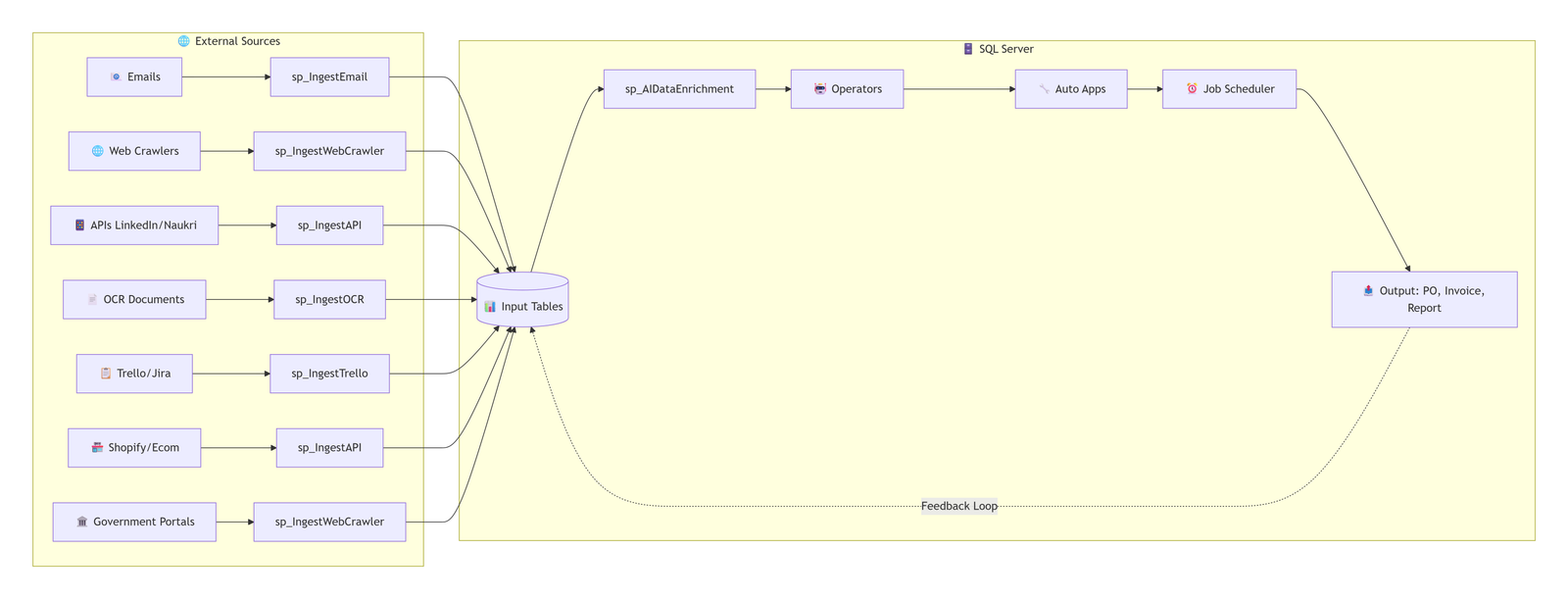
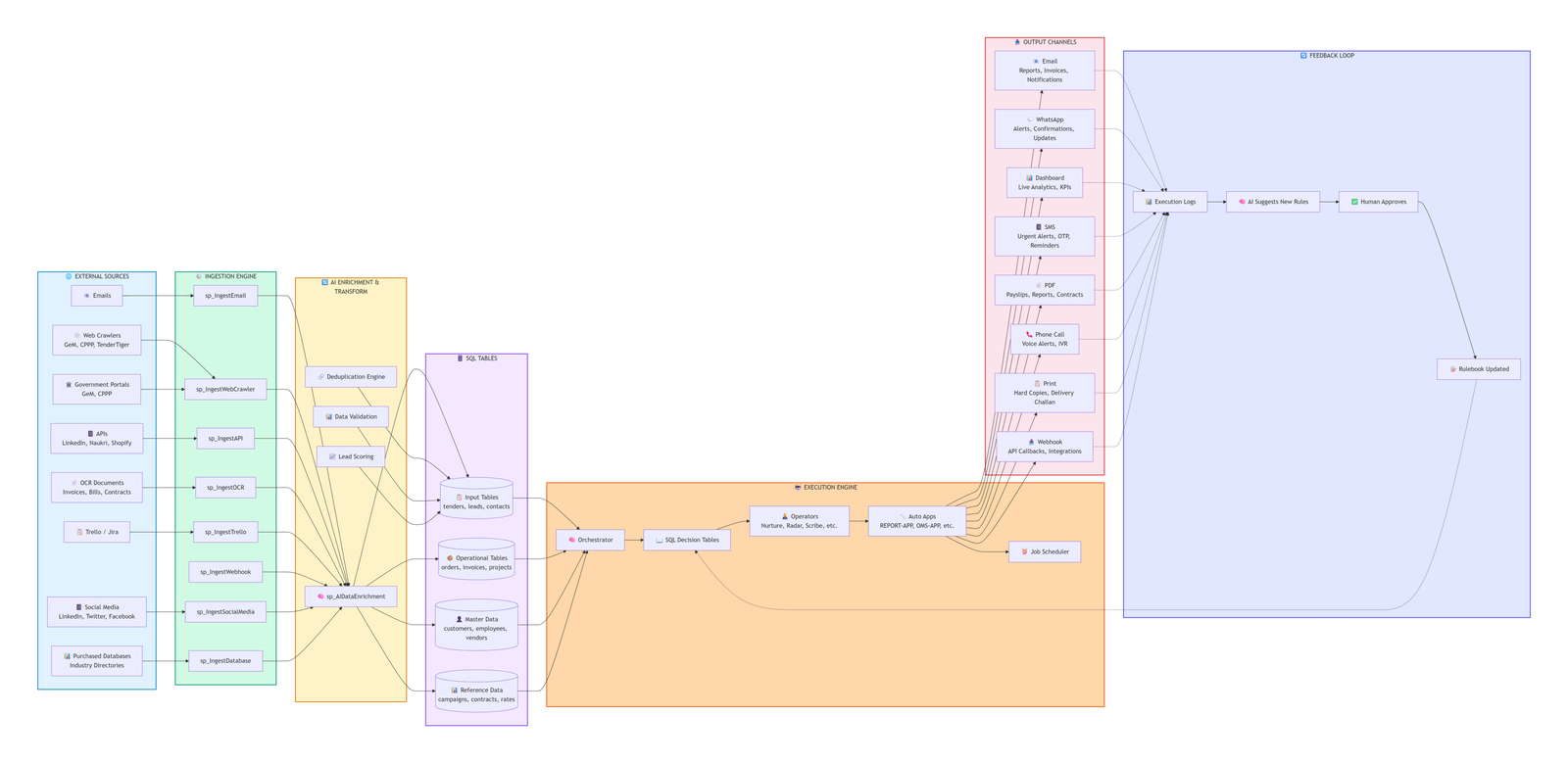
System Flow
Visual walkthrough of how data is ingested and triggers autonomous actions.
📈 End-to-End Flow: Ingestion → Execution → Output
Source" participant Ingestion as "⚙️ Ingestion
Engine" participant Tables as "🗄️ SQL
Tables" participant Orchestrator as "🧠 Orchestrator" participant Rules as "📖 Decision
Tables" participant Operator as "🤖 Operator" participant Tools as "🔧 Auto Apps" participant Output as "📤 Output" External->>Ingestion: Web Crawl / API / OCR / Email Ingestion->>Tables: Auto-Populate Tables Tables->>Orchestrator: New Data Detected Orchestrator->>Rules: Query Matching Rule Rules-->>Orchestrator: Return Action Orchestrator->>Operator: Assign Task Operator->>Tools: Execute Auto App Tools->>Output: Email / PO / Invoice / Report
Detailed Flow Chart
Visual walkthrough of how a self‑driven enterprise app works.
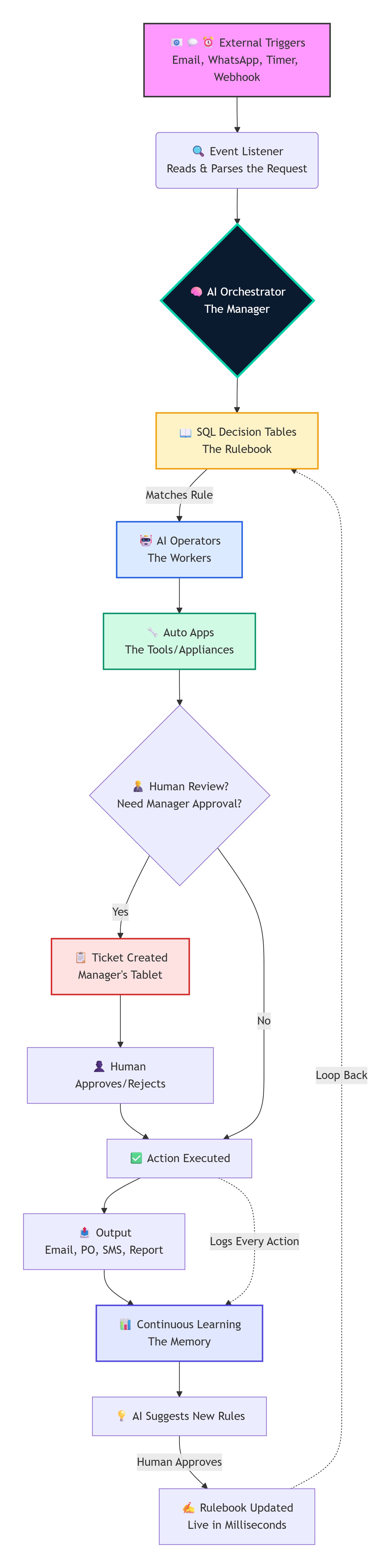
Flow Chart
Visual walkthrough of how a self‑driven enterprise app works.
📝 Declarative Studio — YAML ↔ Mermaid ↔ SQL
⚡ 3‑Way Sync: Edit YAML (source of truth) → auto‑generates Mermaid (visual) and SQL (executable). Import/Export YAML for version control.
📄 YAML (Source) declarative rules
📊 Mermaid (Visual) flowchart TD
🗄️ SQL (Executable) deployable rules
-- SQL will appear here after sync --
💡 YAML Schema: Define rules with id, priority, condition (field/operator/value/min/max), and action (type/params). The system syncs to Mermaid and SQL.